Webhooks for Real-Time Integration
1. Webhooks for Real-Time Integration in SaleSmartly
Webhooks revolutionize app integration by enabling instant data transfer between platforms. In SaleSmartly, webhooks let you receive real-time notifications for events like new messages, customer updates, or system triggers, seamlessly connecting your CRM, chatbots, or custom tools.
2. Key Features
2.1. Introduction to Webhooks
Webhooks are automated HTTP callbacks that transmit real-time data between apps. When a predefined event occurs (e.g., a new message or customer update), SaleSmartly sends a payload to your specified URL, triggering actions in connected systems.
SaleSmartly provides webhook capabilities that support customers to push messages from social media accounts integrated into the SaleSmartly system to designated products through webhooks. For example, suppose a customer has his customer service system. In that case, after SaleSmartly integrates social media accounts, he can connect different social media information to his customer service system through webhooks for replies.
2.1.1. Example Scenarios
- GitHub: Configure webhooks in the code repository to trigger the CI/CD pipeline to automatically build and deploy when new code is submitted.
- Payment system: After the payment is successful, the payment gateway sends a webhook notification to the merchant system. The merchant system updates the order status based on the notification and sends a confirmation email.
- Chat application: When a new message is received, the chat application sends a webhook notification to a third-party service, which can automatically reply or log based on the message content.
2.2. Preparation for Webhook Use
2.2.1. Webhook Availability
The webhook function is currently only available to customers with the Max version package. For Max version customers, we will provide dedicated technical personnel to assist in the connection.
2.2.2. Webhook Support Content
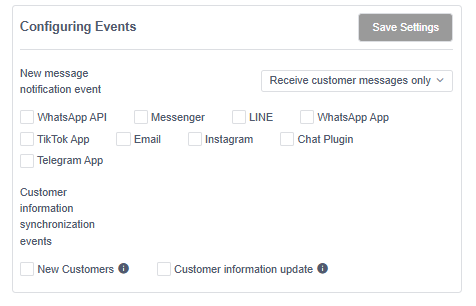
- When configuring new message notification events, you can choose to receive only customer information, only member information, or both customer and member information.
| Support social media channels | Supported message types | Supported message types |
|---|---|---|
| WhatsApp API | Text, pictures, attachments, button messages | Text, Text Button, Image + Text Button, Image + Text Message |
| Messenger | Text, pictures, attachments, button messages | Text, text button, image + text button, image + text message, product carousel |
| LINE | Text, image, button message | Text, text button, image + text button, image + text message, product carousel |
| WhatsApp App | Text, pictures, attachments | Text, pictures |
| TikTok App | Text, pictures | Text, pictures |
| Not supported yet | ||
| Text, pictures | Text, pictures | |
| Chat Plugin | Text, pictures, attachments | Text, pictures, attachments |
| Telegram App | Text, pictures, attachments | Text, pictures, attachments |
- Customer information synchronization events
| Supported synchronization content | Specific content |
|---|---|
| New Customer Creation | Trigger notification when a new customer is created in the SaleSmartly system |
| Customer information update | Trigger notifications when customer information, mobile phone, email, notes, and tags are updated in the SaleSmartly system |
2.2.3. Configure the Webhook Key
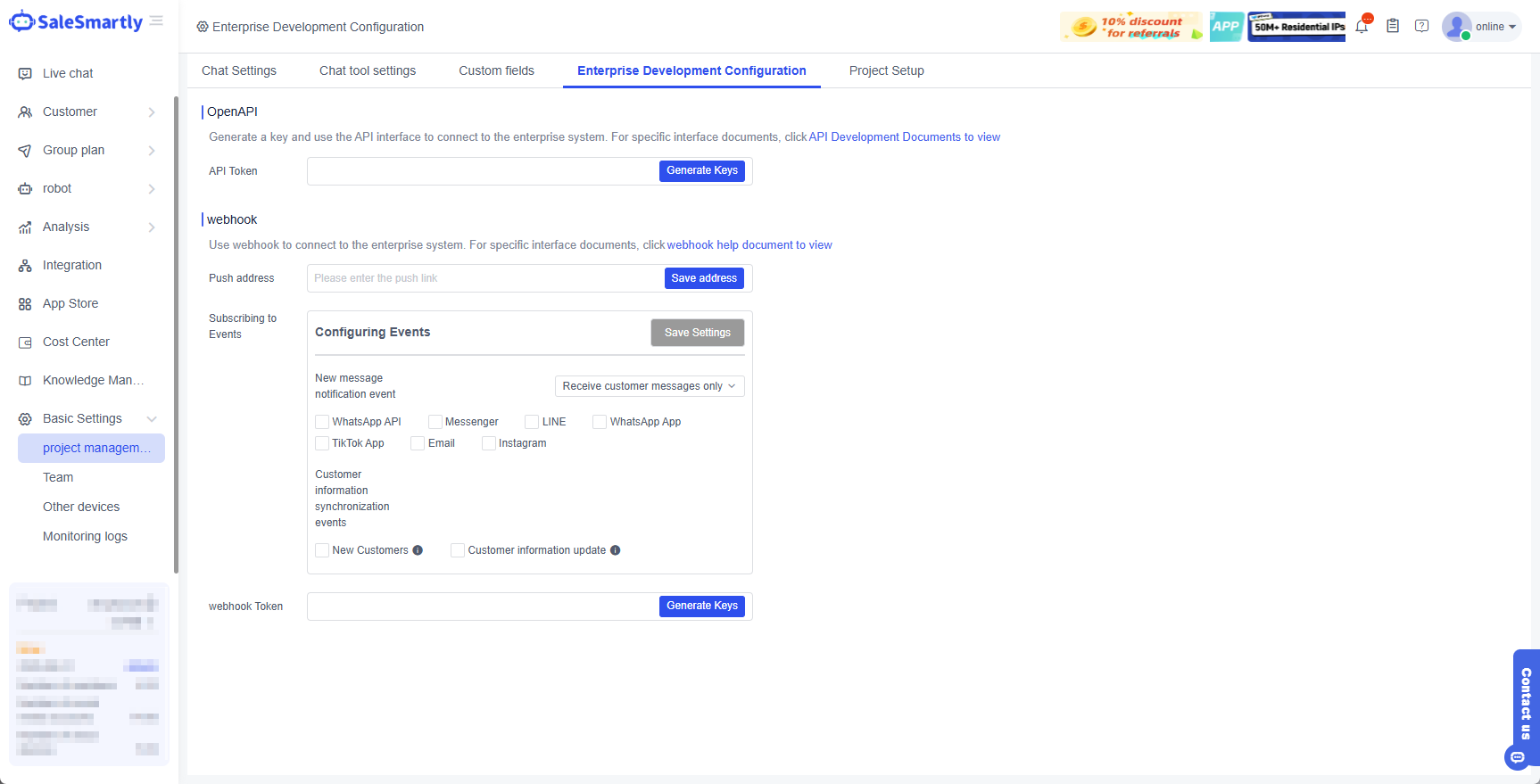
3. Webhook Development Documentation
For the specific development interface documentation of the webhook, click to view the webhook interface documentation.
