SaleSmartly App Guide
1. Introduction to SaleSmartly App Store
The App Store offers a diverse range of practical applications designed to enhance your workflow. This guide provides an overview of its features and use cases, helping you navigate and maximize its capabilities quickly.
2. Key Features of SaleSmartly App Store
The application market is divided into three main sections: my applications, third-party services, and independent stations.
2.1. My Applications
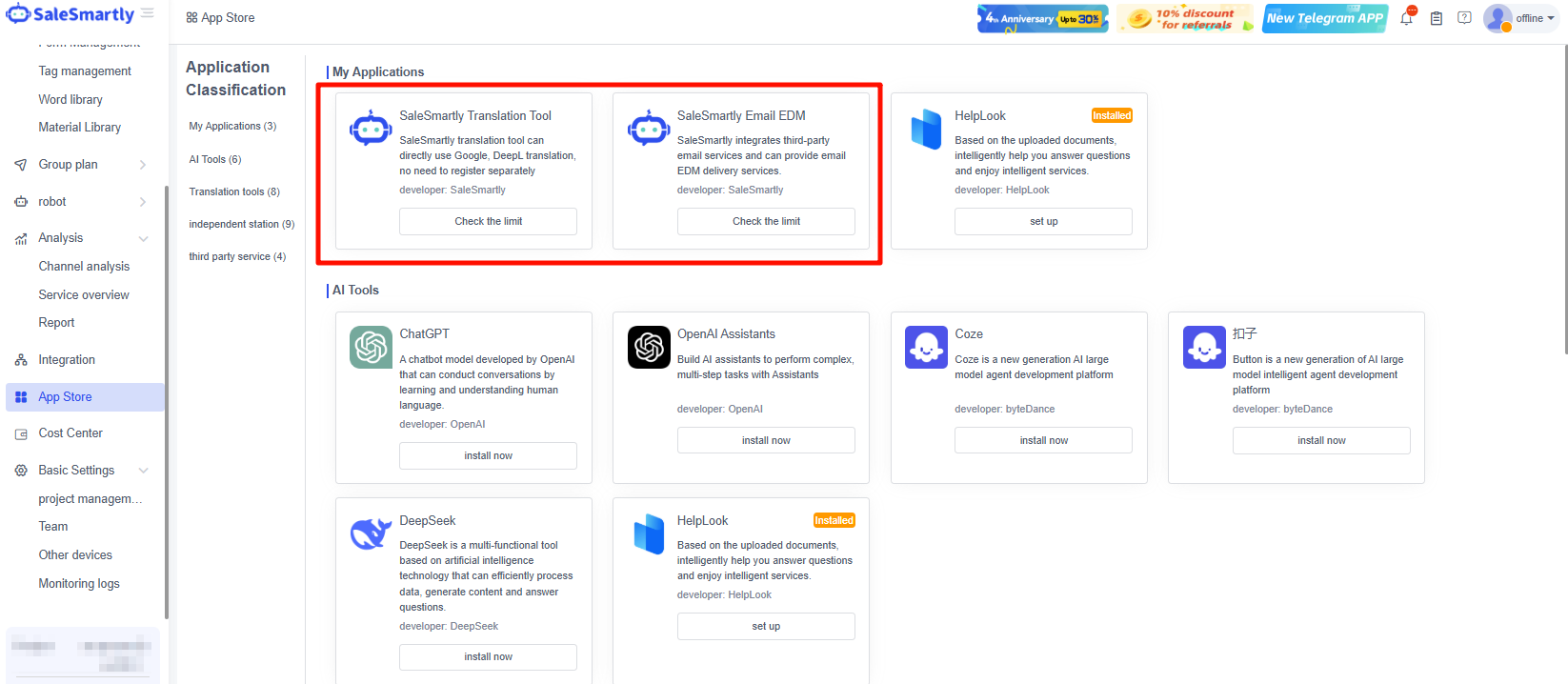
All apps you install from third-party services will be displayed in the My Applications area, where you can set related settings or delete apps, making it easier for you to find and manage them in a timely manner.
Add-On Apps
Enhance your workflow with add-ons like the Salesmartly Translation Tool and Salesmartly Email EDM.
Salesmartly Translation Tool: A built-in translation tool for the system. New users have a basic free quota of 1,000 words to help you chat smoothly in Chat.
Salesmartly Email EDM: A self-developed EDM sending tool. You can purchase quotas to use in EDM Distribution.
You can click Check the Limit to check your existing credit balance and click Add Quota to purchase the system credit limit.
Deleting Apps
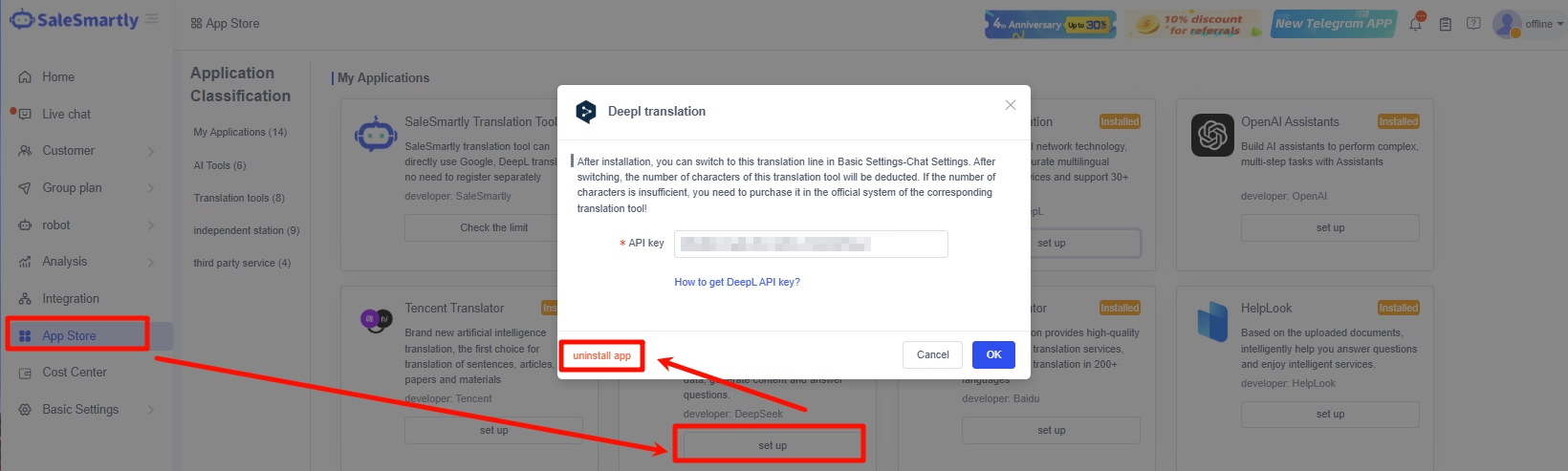
Taking the Deepl translation app as an example, in My Applications > click Set Up > click Uninstall App > click OK to uninstall, and you can delete the app.
2.2. Third-party Services
Currently, SaleSmartly supports seven third-party applications to be integrated into SaleSmartly, including Google Translate, HelpLook, ChatGpt, SendCloud (International), and DeepL, etc.
2.2.1. Google Translate
After installing Google Translate, translations on the Google platform can be supported. This is mainly used in chat sessions with customers. You can change the platform in Basic Settings - Project Management - Chat Tool Settings.
How to obtain the Google Translate API Key during installation? Click here for setup instructions.
2.2.2. HelpLook
HelpLook is a knowledge base tool that enables AI-powered replies via ChatGPT 3.5, supporting self-service inquiries across multiple chat channels (chat plug-ins, WhatsApp, Instagram, Line, etc.).
How to Obtain HelpLook API Token? Click here for setup instructions.
2.2.3. ChatGPT
When customer service agents are busy, ChatGPT can automatically assist in answering customer inquiries.
Note: SaleSmartly prioritizes AI Corpus & Automation. If these are not triggered, ChatGPT takes over.
How to configure ChatGPT during installation? Click here to view the documentation.
2.2.4. SendCloud (International)
SendCloud (International) can provide EDM marketing and distribution capabilities to meet your needs.
How to obtain SendCloud Api parameters during installation? Click here to view the documentation.
2.2.5. DeepL
DeepL uses advanced neural networks for high-accuracy translations across 30+ languages.
How do I obtain the DeepL API key during installation? Click here to view the documentation.
2.3. Independent Website Integration
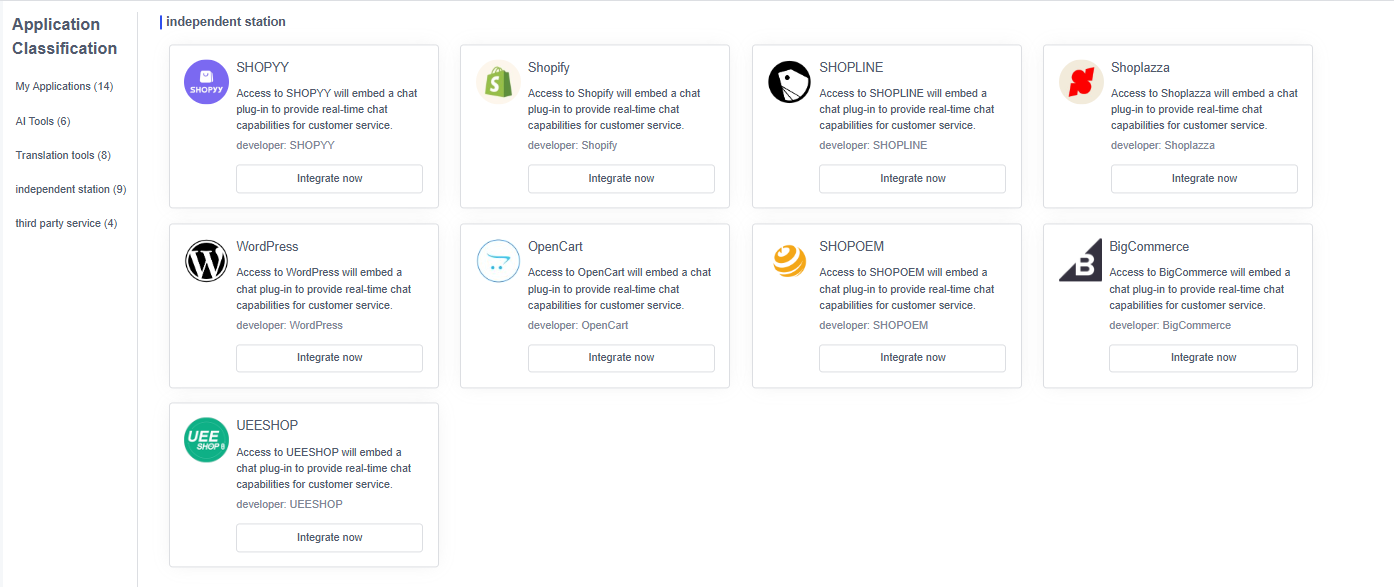
SaleSmartly has been integrated into all major independent station platforms. You can integrate SaleSmartly into your independent station and use the rich functions of the system such as chat plug-ins to receive customers, promote marketing, and increase the chat order rate.
Note: In addition to the ones shown in the picture, you can also go to your independent station platform-app store, search for SaleSmartly > click Integrate/Install to successfully integrate.
Below are the integration guides for major independent stations:
- ShopLazza: ShopLazza-SaleSmartly Help Center
- ShopLine: ShopLine - SaleSmartly Help Center
- WordPress: WordPress - SaleSmartly Help Center
- Shopify: Shopify - SaleSmartly Help Center
- BigCommerce: BigCommerce - SaleSmartly Help Center
- OpenCart: OpenCart - SaleSmartly Help Center
- UEESHOP: UEESHOP - SaleSmartly Help Center
- oemsaas: oemsaas - SaleSmartly Help Center
- MeShop: MeShop - SaleSmartly Help Center
- Shoptop: Shoptop - SaleSmartly Help Center
- ZenCart: ZenCart - SaleSmartly Help Center
- Shopyy: Shopyy - SaleSmartly Help Center
- LeadongShop: LeadongShop - SaleSmartly Help Center
- FunPinPin: FunPinPin - SaleSmartly Help Center
- XShoppy: XShoppy - SaleSmartly Help Center
- Squarespace: Squarespace - SaleSmartly Help Center
- Google Tag Manager: Google Tag Manager integrated with SaleSmartly URL plugin - SaleSmartly Help Center
- BelikeShop: BeikeShop-SaleSmartly-Help Center-SaleSmartly User Guide
